Every Tuesday, the same outage hit the order tracker, and every Tuesday the leadership team argued about it. The chief financial officer wanted the billing system fixed first. The vice president of operations wanted the order tracker fixed, and the meeting ended with no decision.
Most leaders in that room agree on the problem. Their legacy systems slow every release and cost more to keep running each year. What they lack is a shared starting point, so the same debate returns every month.
Waiting has a price. Maintenance time grows as a legacy application ages, and developers spend more hours patching it than building anything new.
This guide is written for CIOs, CTOs and executive team members who must bring a group to one decision. It moves from shared business goals to a first wave of work with named success criteria. Leadership alignment starts with agreeing on what the business must achieve, not on which tool to buy.
The first decision is not which technology to choose. It is what the business needs to achieve, and the next section explains what an app modernization strategy must decide to get there.
Key Takeaways
- Leaders usually agree that legacy systems hold the business back.
- The real disagreement is about the starting point, not the problem.
- Write down shared business goals before naming any project.
- Rank applications by value, risk and effort before choosing a modernization approach.
- Name a first wave with success criteria that anyone can check.
- Keep an executive sponsor responsible for the final decision.
What an App Modernization Strategy Must Decide
An application modernization strategy decides the order and method of change for software the business already runs. It answers which applications change, how each one changes, and which group moves first. The strategy also sets how the team will judge the result.
Application modernization means updating old applications and platforms so they are faster, more reliable and more useful. The usual goal is to keep the business competitive without rewriting everything at once. A legacy application is often one where maintenance takes more developer time than new work.
Technical debt is the accumulated cost of shortcuts in code, architecture and infrastructure that makes each later change slower, riskier and more expensive. Many legacy applications carry a large load of it. Technology modernization is the wider umbrella, covering networks, data and devices, while application modernization focuses on software.
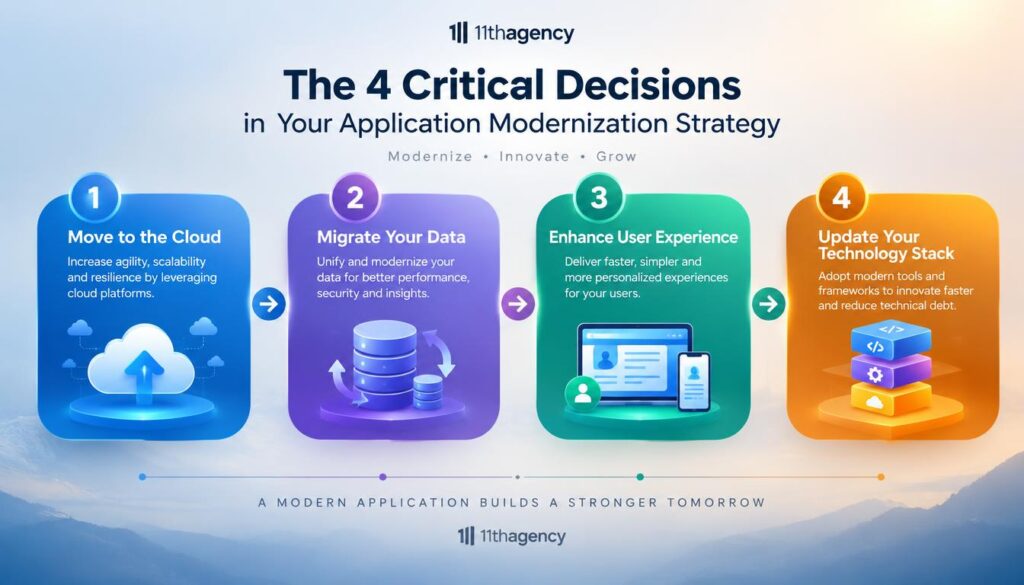
The strategy must answer four decisions in order: the business outcome, the applications, the modernization approach and the first wave. Each decision depends on the one before it.
Answer the four decisions in order, or the first wave will be chosen by the loudest voice in the room.
A sound modern application should meet the six pillars named in the AWS Well-Architected Framework. They are Operational Excellence, Security, Reliability, Performance Efficiency, Cost Optimization and Sustainability. The team can use them as a checklist that defines a healthy application.
Regulated data adds compliance decisions to the business case. Health records fall under HIPAA, and personal data about people in the European Union falls under GDPR, so the strategy must name those rules early.
The four decisions look clear on paper. Leaders still struggle to agree on their order, and the next section explains why.
Why Leadership Teams Stall Before Choosing a Starting Point
Disagreement about the first project is usually a disagreement about what success means, not about technology. Each leader pictures a different win. Until those pictures match, no modernization plan can move forward.
Four blockers appear again and again. Each one can stop a group for months.

- Executives judge by different outcomes. One wants revenue growth, while another wants lower cost.
- Each function feels a different pain. Operations sees incidents, and product sees slow releases.
- Nobody has a full inventory. The loudest legacy application wins the debate.
- The project is framed as a technology choice. Cloud versus rewrite comes up before anyone agrees on the business problem.
A single outage can make a backlog of fixes feel urgent to one executive and unimportant to another. Maintenance that eats developer time instead of new features is another sign that a legacy application has become a problem.
There is one legitimate exception. A regulatory deadline can override the usual order, and the group should name it as the reason for going first.
The first step for the group is to agree on business goals. No approach can be judged until the group names the result it must produce.
Align Business Goals Before Naming Any Project
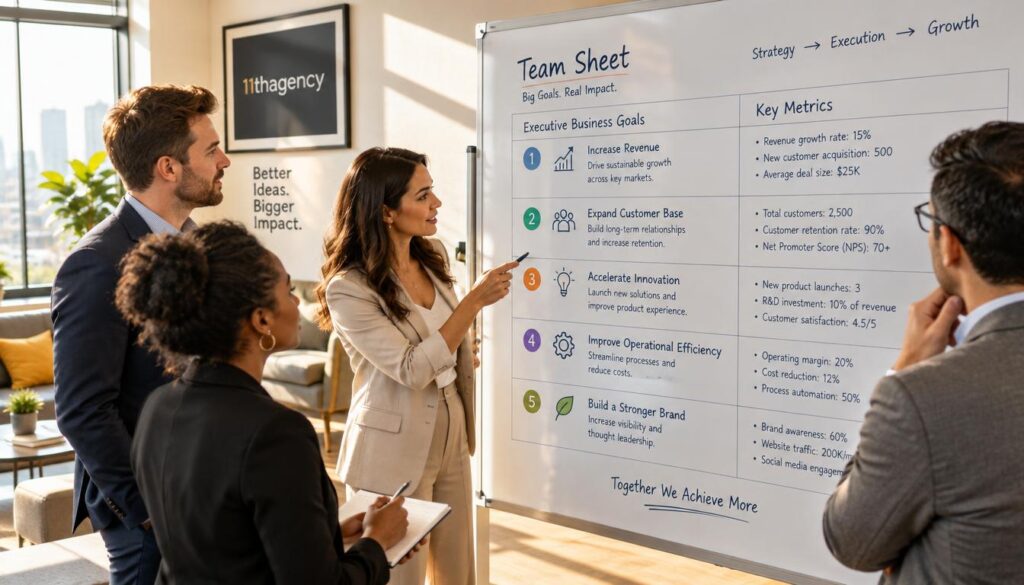
The first meeting should collect each executive’s top metrics in writing before any application is discussed. Each goal goes on one line, with a number attached. Written goals stop the group from arguing about memory.
Interview Executives on the Measures They Track
Ask each executive for the two or three metrics they plan to move this year or this quarter. Record them side by side on one sheet so the differences show up at once.
Executives tend to ask how to increase adoption, retain users, increase revenue, decrease total cost of ownership (TCO) and improve return on investment (ROI). TCO counts every cost of running a system over its life. ROI measures the gain compared with the money spent.
Common executive goals include revenue growth, cost control, service reliability, risk reduction and the ability to change products without adding complexity. A goal about user experience, such as faster checkout, belongs on the same sheet as the cost goals. The team can borrow ideas from a web design approach to user flows, which maps each step a customer takes.
Build a Stakeholder Hassle Map
Next, the team should interview operations, product and technical staff. Ask each person which specific problem costs them time every week.
The hassle map lists each problem, the people who feel it and how often it happens. One row might read: failed nightly batch job, operations team, four times a month.
Every hassle must show a business effect, such as a lost sale or a delayed release. A complaint alone does not belong on the map.
Once goals and hassles sit side by side, the group can see which legacy applications touch them most. That view sets up the inventory.
Inventory Each Legacy Application Against Six Pillars
A finance application runs on a server that no current employee has administered. Nobody knows which libraries it depends on, and the business owner cannot name the last change. No current employee is the kind of gap an inventory must find first.

Each legacy application needs a complete record before scoring. The group must record its purpose, business owner, user count, technologies, dependencies, age and last major change. This table works as a simple application modernization framework for the inventory.
Score each application on four pillars from the AWS Well-Architected Framework: Security, Reliability, Performance Efficiency and Cost Optimization. The table shows the question to ask and the evidence to collect for each one.
| Pillar | Question to ask | Evidence to collect |
|---|---|---|
| Security | Which known vulnerabilities and compliance gaps exist? | Scan results, audit findings, types of data held |
| Reliability | How often does it fail, and how long does recovery take? | Incident log, mean time to recover |
| Performance Efficiency | Does it meet current user load and response targets? | Response time reports, capacity tests |
| Cost Optimization | What does it cost to run and maintain each year? | Hosting bills, developer hours spent on upkeep |
A dependency map shows which applications an outage would hit. Draw it from the inventory so a failure in one connected system does not surprise anyone. Applications that hold health or personal data also need checks against HIPAA or GDPR.
An application with no living owner should be flagged before scoring. Nobody can accept its risk, so the group must assign an owner or plan its retirement first.
Technical debt builds through outdated code, architectural flaws, weak documentation and unsupported dependencies. Once the evidence is in place, the group can rank the applications and decide where the first wave starts.
Rank Applications by Value, Risk and Effort
The best first application is rarely the most visible one. Visible applications often carry the most risk and draw the most attention from people who are not doing the work.

Score each application on six criteria. Give each criterion a score from one to five, and rank the highest total first. The scores show which project offers the best return for the effort.
- Business criticality: how much revenue or daily operations depend on the application.
- User needs served: how many people use it and how well it meets their needs.
- Technical debt: how much shortcut cost sits in its code and design.
- Security exposure: how much risk its data and access controls carry.
- Expected cost reduction: how much hosting and upkeep a change could save.
- Effort to change: how many people and months the change takes.
The common trap is picking the most visible application. That choice often brings the most risk and the least room to recover from a mistake.
A low-scoring application can still move up. If it blocks a high-scoring one, it becomes a dependency, and the team should fix it first.
With a ranked list, the group can choose an approach for each application. Performance and cost targets now set the standard for every choice.
Pick the Right Modernization Approach for Each Application
Rehosting is the fastest move, but it leaves most problems in place. The right modernization approach depends on what the business needs to change, not on what is easiest to move.
Common approaches include rehost, replatform, refactor, rearchitect, rebuild, replace, retain or encapsulate, and retire. Each one changes a different amount of code and carries a different level of risk.
| Approach | Typical effort | Code change | Best fit |
|---|---|---|---|
| Rehost | Low to moderate | None or minimal | Data center exit with a deadline |
| Replatform | Low to moderate | Small, for managed services | Database and server upgrades |
| Refactor | Moderate | Internal restructuring | Hard-to-change code with stable behavior |
| Rearchitect | High | Substantial | Applications that must scale or split into services |
| Replace | Variable | Removes the application | A SaaS product covers the need |
Rehost and Replatform for Speed
Rehosting, also called lift and shift, moves an application to the cloud with few or no code changes. Replatforming makes small changes, such as moving a database to a managed service.
Rehosting helps when a data center must close by a deadline. A rehosted application can keep its old flaws and costs in a new place.
Refactor and Rearchitect for Lasting Change
Refactoring improves the internal code without changing user-facing behavior. It suits hard-to-change code where the behavior is stable and well understood.
Rearchitecting splits an application into services, often microservices. It costs the most, so it fits applications that must scale or split their work across separate teams.
Rebuild, Replace and Retain for Bigger Decisions
Rebuilding rewrites the application from scratch with modern technologies. Replacing moves the need to a SaaS product, and retiring shuts down applications no one needs. When a ready-made product covers the need, the team can buy it. Some teams hire a SaaS app development firm to build a custom product instead.
Avoid rebuilding when the business rules are not documented. The rewrite will copy behavior nobody understands, including its bugs.
Different applications in one portfolio often take different approaches. That mix is normal, and most teams combine several strategies at once.
Here is a plain application modernization example. A payment application is rehosted first to free data center space. Later, the team refactors its code in a second step, once the new hosting is stable.
Once the approach is chosen, the group needs a way to test it. The next step is to measure whether the change works.
Set Measurable Success Criteria for Each Wave
A success criterion without a baseline cannot show whether anything improved. Measure the starting point before the change begins, and record it with the date.
Every criterion needs a baseline and a review date. The baseline is the value measured before the change, and the review date is when the team checks the result against it.
Good criteria tie back to the business goals set at the start. Examples include deployment frequency, error rate, response time, monthly maintenance hours and adoption rate.
Set one target for each criterion. A target can be a number of maintenance hours below the baseline, so the team knows when the wave has succeeded. Teams that track adoption can borrow methods from improving conversion rates through user experience, such as A/B testing and heatmaps.
Review the metrics when each wave closes. Then decide whether to expand the approach or correct it. This review is the team’s process for keeping control of the work.
A regulatory wave can use a pass or fail criterion instead of a trend. A system either passes the required audit or it does not, and that answer is enough.
Measured criteria need people to run them. The next step is to staff the work with the right roles.
Staff the Work With Teams That Can Operate It
The first wave usually fails for lack of an operator, not a developer. Someone must run the cloud environment after launch, watch it daily and fix it when it breaks.
Four roles cover most first waves. Each one has a clear job in the work.
- Executive sponsor: clears blockers and holds the group to its decision.
- Product owner: ranks the work and decides what each release contains.
- Platform or operations engineer: codifies infrastructure so environments can be rebuilt on demand.
- Developer: owns the code change and its tests.
System administrators can move into this work with scripting training. They already know how the systems behave, which gives them a head start.
Infrastructure as code and CI/CD pipelines are standard practices for operating cloud environments. Infrastructure managed through code avoids drift, the slow gap between the documented setup and the real one. It also allows a safe rollback to the last known good version.
Site reliability engineering applies software engineering to operations work. It helps development and operations teams share the same goals instead of passing blame.
A small team with no cloud experience should hire or partner for one role. A development consulting firm, such as one that offers development consulting and support services, can fill that gap. Training every person at once slows the first wave.
Staffing decides who builds and runs the work. The next question is how security and reliability get built into every release.
Build Security and Reliability Into Every Release
An on-call engineer restarts a failed service at 2 a.m. and hopes it stays up. Automated health checks prevent that late-night scramble by restarting the service without a person.
Shift-left security moves checks earlier in the development lifecycle, so problems surface before release. Put these five checks into every deployment pipeline.
- Automated security scans on code and third-party dependencies.
- Configuration checks that run before each deployment reaches production.
- Health checks with automatic restarts for failed software services.
- Traffic redirection that sends users away from unhealthy instances.
- A rollback test that proves the team can return to the last good version.
A legacy application moved to the cloud can expose data through default settings. Verify access rules before cutover, since defaults often open more access than the team expects.
A compliance-bound application may need a manual approval step in its pipeline. Systems that handle health records under HIPAA often need this step. A named person signs off before release, and the approval is recorded for auditors.
Controls protect the software once it runs. The team must still pay for the work, and that requires a business case.
Build a Phased Business Case the Budget Owners Will Fund
Budget owners fund phases they can stop, not a total they cannot see. Each phase needs a clear result and a point where the money pauses for review.
Total cost includes technology, staff time, training and the disruption of cutover. Hosting bills, software licenses and labor count as tangible costs that can be checked against invoices.
Intangible benefits, such as faster releases and fewer incidents, go in a separate list. Do not count them as cash savings.
| Phase | Goal | Budget signal |
|---|---|---|
| Assessment | Complete inventory and pillar scores | Small, fixed, time-boxed |
| Wave 1 | Move the highest-ranked applications with success criteria | Released in full after the assessment is accepted |
| Wave 2 | Expand the approach to the next ranked group | Released only if wave 1 meets its criteria |
| Retirement | Shut down applications no longer used | Savings tracked against reduced hosting and support bills |
Funding is often released in phases tied to milestones. A discovery phase should be funded separately and kept small. Its job is to produce the inventory, so it should not carry the full project. The team can start that review with a firm’s portfolio, though a portfolio alone does not prove legacy experience.
A stop decision is a sign of control, not failure. When wave 1 misses its criteria, pausing wave 2 saves money the business would otherwise lose.
Once the money is clear, the team must decide whether it needs outside help. That answer depends on the skills it already has.
Decide When an Outside Partner Makes Sense
A partner makes sense when skills are missing for the first wave. It does not replace a decision the leadership team has not made. Some firms sell application modernization services for exactly that gap.
Ask every candidate four questions. Has it shipped similar work in the same regulatory environment, such as HIPAA or GDPR? How does it hand knowledge back to the internal team? Which tools and technologies does it use, and are they tied to one vendor? How does it measure progress against the business goals?
Ask for a review of the candidate’s past work. Check whether the projects include legacy code, not only new apps. Experience with a firm’s own product design does not show it can modernize software that runs the business.
An internal owner must stay accountable even when a partner does the work. The partner builds, and the team decides what happens next.
The partner can build the work, but an internal owner must stay accountable for every decision.
An internal team that already has operators and a tested pipeline may need only an outside code review for a single application. A review is a smaller purchase than a full engagement, and it keeps the work in-house.
A partner is one option among several. The closing advice pulls the whole order of decisions together.
Conclusion
Agreement starts with a shared list of business goals and the first application to change. Leaders who write those down can test every later choice against them.
Modernization does not stop after the first wave. Review the inventory and success criteria on a set schedule, so each new wave starts from current evidence. Room for innovation grows once maintenance time falls and the legacy load shrinks.
Next week, book one meeting. Each executive brings their top two metrics, and the team brings the hassle map.