Why does the SaaS churn rate climb when people sign up for a free trial and then vanish? Often, they never reach the one feature that makes the product worth paying for. Under standard rules, a trial user who leaves before that point still counts as churn.
A trial user is a person who signs up for a free or trial period of the product. Activation is the moment a new user first gets the core value the product promises. Examples include sending a first invoice or finishing a first project.
Picture a small design agency owner who starts a 14-day trial of an invoicing app. She logs in on Monday, clicks around the dashboard for ten minutes, and closes the tab. She never sends an invoice, so she never sees why the app exists.
The SaaS churn rate measures the percentage of customers or recurring revenue lost in a set period. A 5% monthly rate looks small at first glance. Compounded over twelve months, it wipes out about 46% of the customer base.
Measurement, benchmarks, causes, and fixes all come next. The first step is knowing what churn means and which two types matter most.
Key Takeaways
- Trial users who leave before activation count as churn.
- Activation is the first point where a user gets real value.
- A 5% monthly loss adds up to about 46% a year.
- Churn has two main types: customer churn and revenue churn.
- Measuring activation shows trouble before it turns into cancellations.
What Churn Means in SaaS
In SaaS, churn is the share of customers or recurring revenue lost in a set period. Put simply, the churn rate saas teams track is that share, written as a percent. Many teams call it saas churn in planning meetings.
Customer churn, also called logo churn, counts the share of accounts lost. Revenue churn is the share of recurring revenue lost. Both use the same idea, but they can tell very different stories about a business.

Two churn types matter most, and they have different causes. Each one points to a different fix.
- Voluntary churn: the customer chooses to cancel.
- Involuntary churn: the account ends because a payment fails.
Voluntary churn often comes from a poor fit or a weak early experience. Involuntary churn often comes from an expired card, which a team can usually fix faster.
Account size changes the math a lot. Losing one customer that pays $5,000 per month hurts more than losing ten customers that pay $100 each. Those ten lose $1,000 together, which is only one fifth of the big account.
Losing one large account can hurt more than losing many small ones.
The next question is how to turn these losses into a number. The formula is simple, but the period you pick changes the result.
How to Calculate Churn Rate and Which Period to Use
Customer churn rate equals the customers lost during the period, divided by the customers at the start of the period, times 100. Say a company begins the month with 1,000 customers and loses 20. Its churn rate for that month is 2%.

A saas churn rate calculator needs two counts. The first is the number of customers at the start of the period. The second is the number at the end, plus the new customers added in between.
Lost customers equal the start count, plus new sign-ups, minus the end count. Many teams count only paying accounts, so a trial that never pays stays out of the start count. If trial users are included, state that next to the number.
Use the same timeframe for the rate and for any comparison. A monthly rate should be compared with other monthly rates, and an annual rate with annual rates. A subscription churn rate is only useful when the period stays fixed.
Check your saas churn rate today by taking the count at the start of this month. Then count the losses and divide. The same method works for any period you choose.
Customer counts only tell part of the story. The next step is net revenue churn, which measures dollars instead of accounts.
Net Revenue Churn Formula and Worked Example
Net revenue churn subtracts expansion revenue from lost revenue, then divides by starting recurring revenue. The formula is (lost MRR minus expansion MRR) divided by starting MRR, times 100. MRR means monthly recurring revenue, the subscription money a company bills each month.
Expansion revenue is new money from current customers, such as upgrades or extra seats. It offsets losses from cancels and downgrades. A negative result means expansion was bigger than the losses.
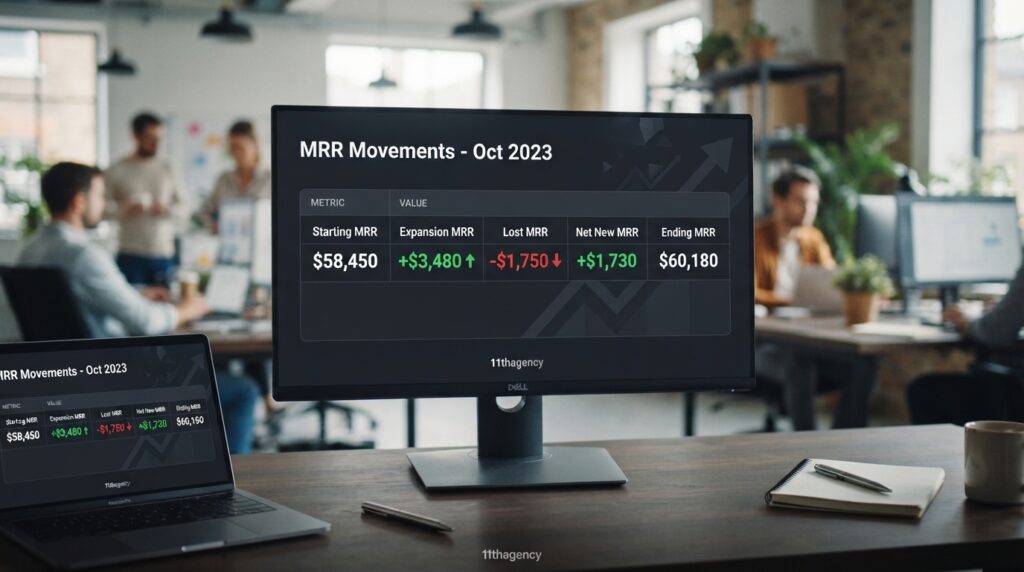
Here is a worked example. A company starts the month with $500,000 in MRR. It loses $30,000 from cancels and downgrades, and it gains $40,000 from upgrades.
| Item | Amount | What it means |
|---|---|---|
| Starting MRR | $500,000 | Recurring revenue at the start of the month |
| Lost MRR | $30,000 | Revenue from cancels and downgrades |
| Expansion MRR | $40,000 | Revenue from upgrades and added seats |
| Net revenue churn | -2% | ($30,000 minus $40,000) divided by $500,000 |
The result is -2%. Expansion beat the losses by $10,000, so the revenue base grew even though some customers left. A negative number is good news here.
Gross revenue churn ignores expansion. In this example, it is 6%, because $30,000 divided by $500,000 equals 6%. Gross figures show how much leaks out, while net figures show the whole picture.
Net revenue retention, or NRR, is 102% in this example. Next, benchmarks show what healthy numbers look like.
What Counts as a Good SaaS Churn Rate
Below 1% a month is the common target for B2B SaaS. Common B2B churn sits near 0.3-1% a month, or about 3.5-5% a year. Many healthy B2B companies stay near the low end of that range.
Models differ a lot. SMB SaaS often runs 3-7% a month, and enterprise SaaS commonly stays at 1% or less. Usage-based or freemium products often run 5-10% a month.

| Model | Monthly churn | Annual churn | Main driver |
|---|---|---|---|
| B2B SaaS | 0.3-1% | 3.5-5% | Contract terms and team fit |
| SMB SaaS | 3-7% | About 31-58% | Small budgets and owner turnover |
| Enterprise SaaS | 1% or less | About 11% or less | Long contracts and high switching costs |
| Freemium or usage-based | 5-10% | About 46-72% | Free users who never pay |
The annual figures in the table compound the monthly rate over twelve months. So what is an acceptable churn rate? It depends on the model, the contract length, and the price.
A 6% monthly rate may be healthy for a freemium tool with many free users. The same rate would be disastrous for an enterprise vendor with long contracts. The number only means something next to the model.
Tracking annual churn helps with planning, while monthly churn shows changes sooner. These churn rates vary by model, so compare yours with its own type. Benchmarks show the target, but the reasons trial users leave explain why many teams miss it.
Why Trial Users Leave Before They See Value
A trial user logs in once, sees a blank screen, and never comes back. That single visit is enough to count as churn. Most trial users never reach activation, the point where they first get the product’s core value.
Over half of B2B SaaS customers reportedly quit when they do not understand how to use the product. Clear names, taglines, and logos help build brand trust, so a visitor feels sure the product is worth testing.
Four causes show up most often:
- No aha moment: the user never reaches the activation point.
- Setup friction: connecting data or inviting a team takes too long.
- Unclear pricing: the user cannot tell what happens when the trial ends.
- Competitor pull: a rival tool looks easier or cheaper in the same week.
The Missing Aha Moment
The aha moment is the activation point, the first time a user sees the product do its main job. A project tool’s aha moment might be the first shared task that a teammate completes. Many trial users never get there.
The setup often ends before the useful part starts. A new user finishes account forms, then faces an empty workspace with no clear next step. The product feels like one more app to check later.
Teams can find the aha moment by looking at the actions of users who stay. Compare them with users who leave after one visit. The gap between the two groups usually points to the activation event.
Setup Friction and Blank-Slate Products
Some products start with an empty screen. A reporting tool with no data shows nothing useful until the user imports a file. Many trial users quit during that import, especially when the file format is unclear.
One trial user connects a calendar integration, sees an empty dashboard with no events, and never returns. The product worked, but nothing on screen showed why it mattered. Each extra form, login step, or permission request is another chance to leave.
Sample data or a ready-made template can help a new user reach value faster. These tools give the dashboard something to show on the first visit.
Unclear Pricing During Trials
Trial users need to know what happens on the last day of the trial. If the price jumps, or the card is needed too early, many of them leave. A clear note of the trial end date and the monthly cost reduces that surprise.
Hiding the price until the trial ends can feel like a trick. A user who sees the cost early can decide whether the product fits the budget. A user who finds the cost late often feels misled and cancels.
Early losses always show up later as lost money. The next section shows how much that money adds up to.
The Cost of Churn Before Activation
Most early cancellations happen within the first 90 days. Commonly, 40-60% of cancellations happen in that window.
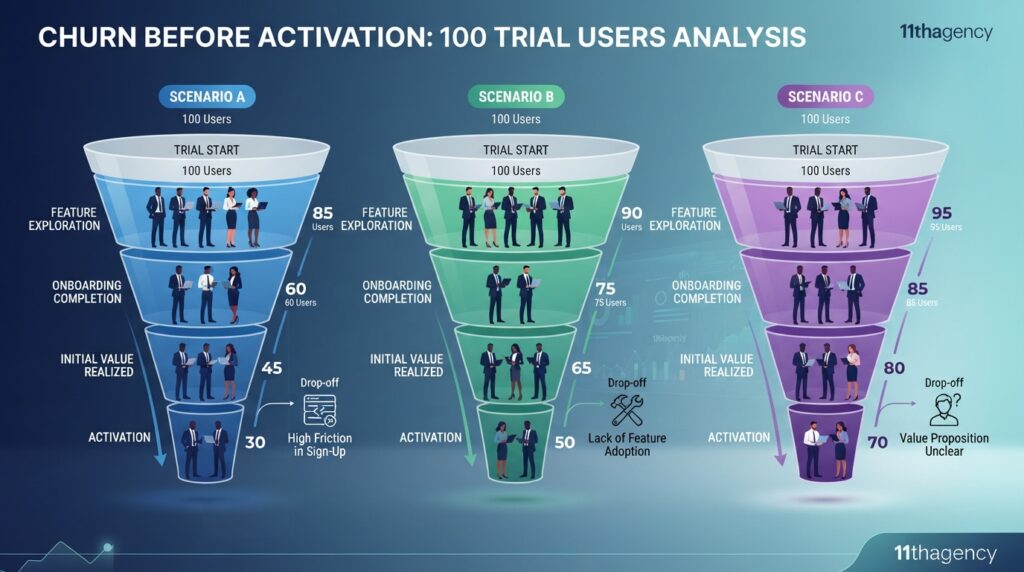
Churn before activation is expensive because acquisition spend is paid up front. Say each trial costs $50 to acquire. Then 100 trials cost $5,000 before any revenue arrives.
| Scenario | Trial conversion | First-90-day churn | Paying customers at day 90 | LTV per customer |
|---|---|---|---|---|
| Low activation | 10% | 60% | 4 | $2,000 |
| Mid activation | 20% | 40% | 12 | $3,333 |
| High activation | 30% | 20% | 24 | $6,667 |
The table is a hypothetical cohort of 100 trials at $100 a month. Monthly churn after day 90 is 5%, 3%, and 1.5%. In the low scenario, $5,000 of trial spend produces four paying customers at day 90.
In the high scenario, the same spend produces 24 paying customers. Acquisition spend on non-activated trials is lost money. The lost spend cannot be recovered later.
Lifetime value, or LTV, is the total revenue a customer brings before leaving. A simple estimate is the monthly price divided by monthly churn. Lower churn after activation raises LTV sharply.
Trial conversion starts on the signup page, which a guide on how to improve conversion rate on a website covers. Measuring activation comes next, so at-risk trials show up sooner.
Measuring Activation Before Churn Shows Up
Activation must be defined before churn can be measured. Pick one action that shows a user got the core value, such as sending a first invoice. Every other metric depends on that choice.
Customerscore’s churn prediction research finds 70-80% of churning customers show warning signs at least 30 days before canceling. That gives a team a window to act.
Use five steps to measure activation:
- Pick the one action that signals core value.
- Record the first time each trial user completes it.
- Count the share of trials that reach it before the trial ends.
- Group trial users into cohorts by signup week.
- Set an alert when usage drops more than 30% month over month.
Defining the Activation Event
The activation event should be one action, not a list of tasks. Sending a first invoice is clear, while finishing setup is not. A clear event lets the team see exactly who got the value.
Test the event against paying customers. Most paying accounts should have done it during the trial. If many paying accounts skipped it, the event is probably wrong.
Write the definition in one sentence and share it with the product and sales teams. Everyone should count trials the same way. Track monthly churn next to the activation rate so both numbers move together.
Building Cohorts by Signup Week
Cohort analysis groups users by the week they signed up. Each group shows how the same kind of trial user behaves over time. Weekly groups make a sudden drop easy to spot.
| Signup cohort | Trials started | Active in week 1 | Active in week 4 | Week-one drop-off |
|---|---|---|---|---|
| Cohort A | 200 | 120 | 70 | 40% |
| Cohort B | 180 | 117 | 81 | 35% |
| Cohort C | 220 | 110 | 55 | 50% |
Cohort C lost half its trial users in week one. That points to a problem early in setup, not a loss of interest later. Cohort B held up best in the first week.
Watching Usage Drops
A usage drop of more than 30% month over month is a common alert threshold. Watch active days, key actions, and team logins. A trial user who once invited teammates and now logs in alone is at risk.
Alerts work best when they lead to action. Send a short tip email or a help link when the alert fires. A call may fit larger accounts.
Activation data is only useful if the team acts on it. The next fix is onboarding, which helps users reach that first win sooner.
Is 20% Churn High, and Is 5% Good?
A 20% annual churn rate is high for enterprise software, but often normal for self-serve tools. Is 20% churn high? It depends on the model. Enterprise contracts run long, so one in five leaving is a clear warning sign.
A 20% annual churn rate means one in five customers leaves within a year. SMB and self-serve products often run higher than enterprise providers with long contracts. That gap is normal, not a failure.
Is 5% good? The answer depends on the period. A 5% monthly rate compounds to about 46% lost in a year, which is far above the B2B range. A 5% annual rate sits close to the B2B range of 3.5-5% a year.
Contract length and price point set the bar. A $20 monthly plan can carry more churn than a $5,000 yearly contract. Onboarding decides how many trial users reach value, so that is where the fix starts.
Rule of 40 and How Churn Shapes Growth
Churn lowers the growth rate that the rule of 40 SaaS score counts. The rule adds revenue growth rate and profit margin, and a score of 40 or more is the usual target. A rise in churn can pull that score below 40.
Take a company that grows 30% a year with a 10% profit margin. Its score is 40. Now churn rises and cuts growth to 25%, so the score drops to 35.
Lower churn works the other way. Reduce churn enough to lift growth to 35%, and the score reaches 45. The margin did not change, but the growth did.
The rule is a benchmark, not a law. Many teams use it as a quick check. A company that scores 35 can still be healthy in a market with slow growth.
Each customer kept is revenue that does not need replacing. The digital agency 11thagency describes its work as helping partners design, build, and launch digital products that support business growth. Better onboarding is the next fix to look at.
Improve Onboarding to Reach Value Faster
In the first session, a trial user should finish one real task, such as sending a first invoice or creating a first project. That first win is what turns a visitor into a user who comes back. Setup should lead there in the fewest steps possible.
Shortening time to value is the goal of good trial onboarding. A 10-20% lift in retention is commonly reported from clear onboarding, though results vary by product. Annual subscribers churn about 3-5 times less than monthly ones.
Five steps shorten the path to value:
- Write the first win in one sentence.
- List every screen a user must pass before that win.
- Remove or merge any screen that does not help the win.
- Show the next step on screen at every point.
- Time a new user from signup to the win, then repeat monthly.
A team that does UX audits of an existing product can find the steps that slow new users down. A SaaS app development services provider can also map user needs before design starts.
Map the Path to the First Win
Start with the first win and work backward. Each screen should answer one question for the user. If a screen answers none, it is a candidate for removal.
Walk the path yourself as a new user would. Note every moment you pause or feel unsure. Those pauses mark the steps that need the most attention.
Keep the path short and visible. A user should always see where the win sits and how far away it is.
Use Checklists and Milestone Messages
A four-item checklist might read: connect your account, add one client, create one invoice, send it. The last item is the first win, so the checklist ends there. Nothing after it distracts the user.
Send a short message after each step, such as “Your first client is saved.” Each message confirms progress and points to the next task. Users who see progress are more likely to keep going.
Keep the checklist to three to five items. A long list feels like homework and invites users to skip it.
Cut Steps Between Signup and Value
Remove optional fields at signup, and ask for a company name later. Every extra field adds a reason to stop. Asking less at the start keeps more trial users in the flow.
Do not push heavy onboarding on everyone. Power users who already know the product can slow down under long tours. Offer a skip option for them.
Fewer steps lead to a faster win, but a fast win still needs a reason to pay. Some customers still cancel, so the next fix is how billing works.
Recover Failed Payments and Fix Billing Friction
Failed payments can cause a large share of churn. Involuntary churn often accounts for 20-40% of total churn. The customer did not decide to leave, but the account still ends.
Annual billing cuts the number of payment events from twelve to one. Fewer charges mean fewer chances for a card to fail. Monthly plans need a stronger plan for recovery.
Payment recovery works best as a set of small, timed steps. Four fixes cover most billing friction:
- Send pre-expiration reminders before a card expires.
- Retry failed charges automatically on a set schedule.
- Offer self-service card updates from the account page.
- Offer annual billing as an option for monthly customers.
Pre-Expiration Reminders
Send a reminder about 30 days before a card expires, and again a week before. The message should name the plan and the date. A short, clear note is easier for a customer to act on.
Include a direct link to the card update page. Every extra click gives the customer one more reason to put it off. Keep the wording calm and plain.
Reminders do not fix a missing balance. They help customers who simply forgot to update a card.
Automatic Payment Retries
A common sequence works like this. The first charge fails on day 0. The system retries on day 3, sends an email on day 4, retries on day 7, and sends a final notice on day 10.
Retries catch temporary problems, such as a bank hold or a card limit that resets. Spread the attempts over several days instead of trying again at once. Too many tries in a row can cause more declines.
Track which retry succeeds most often. That data shows whether the schedule needs to change.
Self-Service Card Updates
A simple update page lets the customer add a new card in a few clicks. Teams can build this with custom web development, so the page matches the rest of the product. The customer should never need to email support for a card change.
Show the plan name and the next charge date on the same page. A customer who sees both can fix the card before a charge fails. Clear labels reduce mistakes.
Some customers still want to cancel. Their choice holds useful lessons about the product.
Use Cancellation Feedback and Engagement Signals to Predict Churn
A cancellation survey shows the reason behind a cancel, often in one or two questions. That reason is more useful than the cancel itself. Cancellation surveys commonly show that pricing concerns drive about 10% of churn.
Revenue churn analysis works best when each lost dollar has a reason attached. A pattern of reasons shows which fixes will protect the most revenue.
Exit surveys show the reason behind a cancel, so that reason should shape the health score.
Ask one question at cancel, such as “What was the main reason you left?” Offer a short list of options, plus a text box for details. Keep the survey short so people finish it.
Exit Surveys That Explain the Cancel
A budget-conscious user may say the price is too high right now. Instead of losing the account, the product can offer a pause of up to three months. The data stays saved, and no charge applies during the pause.
Some users take the pause, and the account stays open. Others return when their budget improves. Either way, the team keeps a customer it would otherwise lose.
Group the survey answers each month. Look for the top two reasons, then test one fix for each.
Engagement Health Scores
Health scores combine signals into one number. Common signals include logins, team size, feature use, and billing status. Each signal gets a weight, so the most useful ones count the most.
A score from 0 to 100 sorts accounts into three tiers. Higher scores mean higher risk. Use the tier to decide who gets outreach first.
| Health tier | Score range | Typical signal | Action |
|---|---|---|---|
| Healthy | 0-33 | Weekly logins and steady use | Share tips and an upgrade path |
| At-risk | 34-66 | Usage down more than 30% month over month | Send a short tip email and offer a call |
| Critical | 67-100 | No login in 14 days or a failed payment | Personal outreach and a pause option |
Check the scores each week and compare them with the cancellation reasons. A high score that ends in cancellation shows a gap in the model. Adjust the weights when that happens.
Every fix starts with knowing why trial users leave, and that is the best place to begin.
Conclusion
Trial churn is measurable, and it is fixable. Teams that count trial users who leave before activation can see the problem in a number.
Define activation before anything else. Without a clear first win, cohorts, alerts, and onboarding changes have nothing solid to measure against.
Your next step is this: define the aha moment this week, then build a 30-day cohort table from your signups. Record the share of each signup week that reaches the win, and check it every Monday.